
Messages | Version française |


? | Home page | Tutorial | Mixing in practice | Vocals

Site de Grebz
Home page


VOCALS

Reminder: we are working on the song Life, an original composition:


(mp3 file)

To record the vocals, I used a Rode NT5, a small-diaphragm condenser microphone that I also use for recording theater plays. It's a compact mic with a small diaphragm and excellent sensitivity. I find it more effective and faithful than the Shure SM57 dynamic mic I used previously. The high-end reproduction, in particular, is much better with the Rode, and the overall sound feels more open and airy. Like all condenser microphones, it requires 48V phantom power, which I activated on my preamp. The mic is connected via an XLR cable to my AudioBuddy transistor preamp by M-Audio—an affordable and very transparent preamp that adds no coloration or hiss—which is then linked to my audio interface.

In the song Life, there is one lead vocal track and two backing vocal tracks. These are recordings of my own voice using the Rode NT5. However, there are also two vocal tracks created with Miroslav Philharmonik, a virtual instrument software for classical sounds (violins, flutes, etc.), so I composed these virtual vocal parts on a MIDI track.

Here is the list of plugins I used for the vocals:
* FinalPlug by Wave Arts, a limiter
* Miroslav Philharmonik by IK Multimedia, a very comprehensive virtual philharmonic orchestra. It's not the absolute best, and it's quite old, but it remains excellent and especially unmatched at its current price (€120). I mainly use it to compose music for theater plays.
* WizooVerb by Wizoo, a reverb plugin
* TrackPlug by Wave Arts, a parametric equalizer
* Classic Delay by Kjaerhus Audio, a simple and free delay

Let's see how to process the different types of vocals, including volumes, panning, and plugins...

Lead Vocal Line

Backing Vocals

Virtual Vocals

Main Vocal Bus

Mixing in practice : Preparing the session | Bass | Drums | Rhythm guitars | Lead guitars | Synths | Vocals | Mastering
Haut de page

MAIN VOCALS

Recording Track - "Dry Lead Vocals" Bus - "Reverb" Bus - "Delay" Bus - "Lead Vocals" Bus

Recording Track

Mono audio track
Panning: Center
Volume: 0 dB
Plugin: Limiter
Destination: "Dry Lead Vocals" bus


When recording my voice, I made sure the recorded volume was around -10 dB to avoid any risk of clipping and to maintain enough headroom. However, since this volume is relatively low, I placed a limiter on the track to boost the signal significantly. This compression helps bring the vocals to the forefront compared to other instruments, though it is obviously not the only factor. My limiter is set with a threshold of -12 dB and a ceiling of -0.1 dB. The track signal is then routed to a bus I named "Dry Lead Vocals." The limiter used is the FinalPlug plugin by WaveArts. This is a paid plugin, which you can replace with George Yohng's W1 Limiter, an excellent free limiter downloadable on this page.

This track is routed to the bus I named "Dry Lead Vocals," described below.

"Dry Lead Vocals" Bus

Source: Lead vocal recording track
Destination: "Lead Vocal Reverb" and "Lead Vocal Delay" buses
Panning: Center
Volume: -23 dB.


The volume is set to a low value because the effects on other buses, which will be added later, will boost the overall volume of the lead vocals. Furthermore, sufficient headroom must be planned to avoid clipping the Master bus at the end of the chain—the bus where all instruments and vocals converge. If the volumes of all buses were at 0 dB, it would obviously cause a major problem on the Master bus, and likely even before reaching that final stage.

Here are the lead vocals as recorded, without effects:


(mp3 file)

The limiter on the track is not activated here, which is why the sound is very quiet.

This raw sound is then routed to two other buses: the bus containing the reverb, and the bus containing the delay. They are described one after the other below, but they are processed in parallel within the sequencer before converging further down the line.

"Lead Vocal Reverb" Bus

Source: "Dry Lead Vocals" bus
Destination: "Lead Vocals" bus
Panning: Center
Volume: -6 dB.
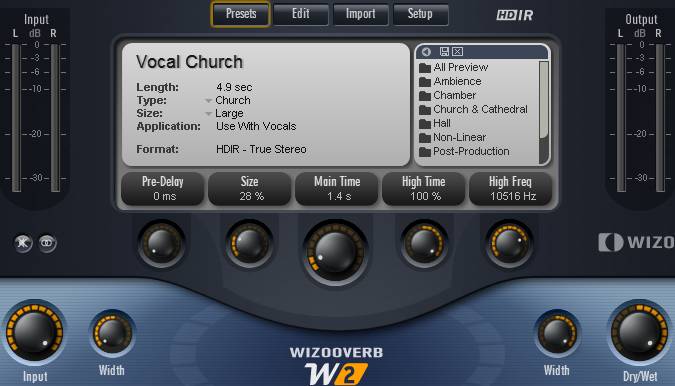

With its volume at -6 dB, the reverb is 6 dB lower than the dry vocals to avoid drowning them out. The goal is simply to add some "air" and ensure the sound isn't too dry.
Here are the lead vocals with reverb.
You only hear the reverb alone here, not mixed with the dry vocals.


(mp3 file)

I used the WizooVerb plugin, a plugin that hasn't been sold for several years but still sounds great. It can still be found in the darker corners of the internet (I don't condone this, but you do as you wish), or you can use other paid or free reverb plugins. They are easy to find, and I suggest a few on this page. I commonly use SIR Convolution, which works with impulses, much like cabinet simulators. But instead of using cabinet impulses, we use room impulses recorded in various locations (from bathrooms to cathedrals, concert halls, or rooms in a house).

Here are the settings used with the WizooVerb plugin by Wizoo:

- I used the "Vocal Church" preset. I reduced its "size" to 28% to avoid the impression of recording in too large a space; the decay time is set to 1.4s and I adjusted the "Width" parameters so the reverb spreads across the entire stereo field.

- The reverb blend is controlled with the "DryWet" knob. At 0%, no reverb is heard; at 100%, only the reverb is heard without the dry signal. Here, it is set to 100% because the reverb plugin is placed on a bus dedicated solely to reverb, which will later be mixed with other treatments (the dry sound and the delay). I only want the reverb sound and nothing else here.

- Using reverb on a voice is common. The dosage is up to each individual, but too much reverb distances the voice, which ends up drowned in the mix. For the lead vocal line, this is not the desired effect; on the contrary, the voice must be brought forward since it often carries the melody.
Wizooverb Plugin
Wizooverb Plugin

"Lead Vocal Delay" Bus

Source: "Dry Lead Vocals" bus
Destination: "Lead Vocals" bus
Panning: Center
Volume: 0 dB


Here are the lead vocals with delay.
You hear the delay added to the dry vocals here.


(mp3 file)

On this bus, I use the Classic Delay plugin by Kjaerhus Audio, a free plugin you can download on this page. The delay adds an echo effect to the sound, which helps fill out the sonic space. Combined with the reverb, this gives the lead vocal line a somewhat atmospheric feel.

The settings as seen in the image below produce an effect where the original sound arrives first (adding to the dry vocals), then a first echo appears after about 1 second, slightly quieter than the dry sound, and then 1 second later, a second echo is audible, but much quieter than the first. In the full mix of the song, it is almost inaudible, but it nonetheless contributes to the overall sound.

Classic Delay Plugin

"Lead Vocals" Bus

Source: "Dry Lead Vocals", "Lead Vocal Reverb", and "Lead Vocal Delay" buses
Destination: Main Vocal bus
Panning: Center
Volume: -5 dB
The dry vocal, reverb, and delay buses now all converge into the "Lead Vocals" bus.
Here are the lead vocals with reverb and delay.


(mp3 file)

However, processing is not finished, as we are going to add an equalizer and a limiter.
Same thing, but with an equalizer and a limiter.
Heads up: the volume is much higher.


(mp3 file)

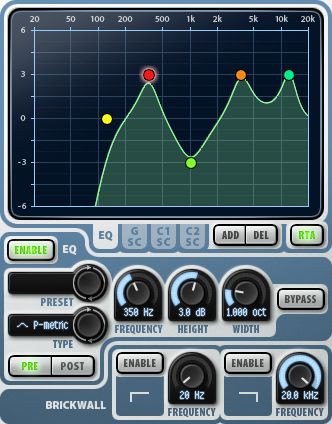
You can see in the image below how I equalized the voice. Specifically, I removed all low frequencies by placing a low-cut filter at 120 Hz. I also lowered the frequency around 1 kHz by about 3 dB, as it contributed nothing to the voice and freed up space for other instruments. Finally, I boosted the 345 Hz, 3.60 kHz, and 12 kHz frequencies by about 3 dB to better highlight the voice in the mix. Of course, these frequencies work for *my* voice and in this specific song, but in another song, the settings would be different. There is no single setting that fits all situations.

The plugin used is TrackPlug by Wave Arts, a paid plugin, but free ones exist, such as Cockos ReaEQ which you can download on this page.


TrackPlug Plugin
TrackPlug Plugin

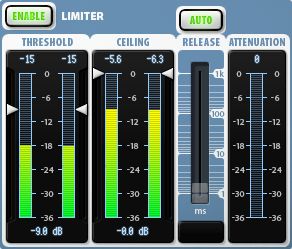
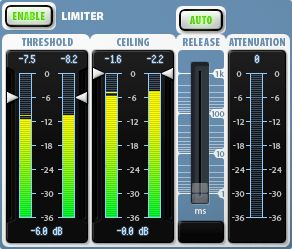
Next, I applied a limiter with a threshold at -9 dB and a ceiling at 0 dB (thus limited to the bus volume), which significantly boosts the vocals to place them at the forefront of the song.

The plugin used is FinalPlug by Wave Arts, a paid plugin that you can replace with George Yohng's W1 Limiter, an excellent free limiter downloadable on this page.


FinalPlug Plugin
FinalPlug Plugin
That's it, the processing of the lead vocal line is complete. Below, we will see how I proceeded with the backing vocals, then with the virtual vocals. These three vocal groups will meet on the main vocal bus before finishing on the Master bus with all the other instruments of the song.

Mixing in practice : Preparing the session | Bass | Drums | Rhythm guitars | Lead guitars | Synths | Vocals | Mastering
Haut de page

BACKING VOCALS

There are two backing vocal recordings; one will be heard on the left and the other on the right of the stereo field. Both backing tracks have the same content, but it is not a copy-paste: I recorded the two backing tracks separately so that they differ slightly from one another.

Recording Tracks - Raw Takes - Reverb - "Backing Vocals 1" and "Backing Vocals 2" Buses - Automation

Recording Tracks

There are two vocal tracks for the backing vocals. I recorded them separately, so they are indeed two distinct recordings and not a simple copy-paste from one track to another.

Mono audio tracks
Panning: Center
Volume: 0 dB
Destination: The 1st track is routed to the "Dry Backing 1" and "Backing 1 Reverb" buses; the 2nd track is routed to the "Dry Backing 2" and "Backing 2 Reverb" buses


As with the lead vocal track, I recorded these two tracks ensuring the recorded volume stayed on average around -10 dB. However, I am not adding a limiter here.

The first backing track is then routed simultaneously to the "Dry Backing 1" and "Backing 1 Reverb" buses, while the second backing track is routed to the "Dry Backing 2" and "Backing 2 Reverb" buses.

"Dry Backing 1" and "Dry Backing 2" Buses

Sources: Backing 1 and Backing 2 tracks
Destinations: "Backing 1" Bus and "Backing 2" Bus
Panning: Center
Volumes: 0 dB


Here is Backing Vocal 1 as recorded without effects:


(mp3 file)

And Backing Vocal 2:


(mp3 file)

Of course, the two recordings are similar, as I tried to sing identically. But since I am not a machine (!), even when trying to do the same thing twice in a row, small differences remain. These aren't really audible but prevent having the exact same sound in both ears. With a copy-paste, if you place a sound on the left and its exact copy on the right, you end up with a mono sound in the end. Whereas with *nearly* identical sounds, you preserve the stereo. Unless you shift one sound by a few milliseconds relative to the other, which then creates a slight chorus effect.

Reverbs are added on two other buses, which will then be combined with the dry sound.

"Backing 1 Reverb" and "Backing 2 Reverb" Buses

Sources: Backing 1 and Backing 2 tracks
Destinations: "Backing 1" Bus and "Backing 2" Bus
Panning: Center
Volumes: -6 dB


Here is Backing Vocal 1 with reverb
You only hear the reverb alone here, not mixed with the raw vocals.


(mp3 file)

And the reverb for Backing Vocal 2:


(mp3 file)

I used the Wizooverb plugin again with the settings shown in the image below. Here are the settings used with the WizooVerb plugin by Wizoo:

- I used the "Cathedral" preset. I set the "size" to its maximum (100%) to achieve a large space effect and give the impression that the backing vocals are in the background. The decay time is set to 2.8s and I adjusted the "Width" parameters so the reverb spreads across the entire stereo field. However, as each backing vocal will only occupy the right side of the stereo field for one and the left for the other, each reverb will remain confined to the right for one and the left for the other. But at this stage, the panning is not yet set, so the examples place the sound in the center.

- The reverb amount is controlled with the "DryWet" knob. At 0%, no reverb is heard; at 100%, only the reverb is heard without the dry signal. Here, it is set to 100% because the reverb plugin is placed on a bus that only processes reverb, which will later be mixed with other treatments (in this case, the dry sound). Therefore, I only want the sound of the reverb and nothing else here.

- The reverb settings are identical for both backing vocals with one exception: for Backing Vocal 1, the "High Freq" parameter is set to 7107 Hz (as seen in the image below), while for Backing Vocal 2's reverb, this setting is at 3600 Hz. This means these high frequencies are not boosted the same way on both backing vocals. This setting is not available on all reverb plugins, but one could reproduce the same effect by adding an equalization plugin after the reverb with appropriate settings. This helps distinguish the two backing vocals a bit more.
Wizooverb Plugin
Wizooverb Plugin

"Backing 1" and "Backing 2" Buses

Sources: "Backing 1 Reverb" and "Backing 2 Reverb" buses
Destinations: Main Vocal bus
Panning: Variable, set by different automation on the two buses. Mostly 70% left for Backing Vocal 1 and 70% right for Backing Vocal 2.
Volumes: Variable, set by different automation on the two buses. Mostly at -10 dB.
Plugins: an equalizer and a limiter on each bus
Here is Backing Vocal 1 with dry sound and reverb:


(mp3 file)

And Backing Vocal 2:


(mp3 file)

I add an equalizer and a limiter, as well as the final stereo placement.
Here is Backing Vocal 1 with dry sound and reverb. It is located on the left in the stereo field:


(mp3 file)

And Backing Vocal 2. It is located on the right in the stereo field:


(mp3 file)

And finally, both together:


(mp3 file)

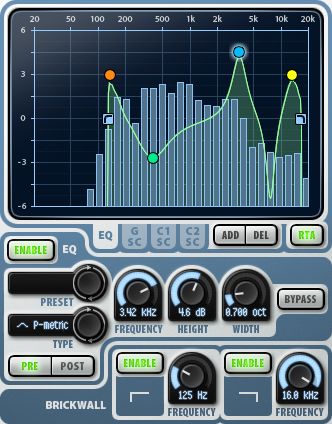
You can see in the image below how I equalized the backing vocals. Note that the settings are identical for Backing 1 and Backing 2. I cut all low frequencies by placing a brickwall low-cut filter at 125 Hz. This frequency is nonetheless boosted at +3 dB to provide some foundation in the low-mids. I scooped out the mids between 200 Hz and 2 kHz, with a more notable dip of -2.6 dB around 380 Hz. I boosted by +4.5 dB around 3.3 kHz. I scooped by 6 dB around 7.5 kHz and boosted by 3 dB around 13 kHz to bring in some air and brilliance to the backing vocals. Finally, I applied a brickwall high-cut at 16 kHz. There wasn't much useful information beyond this frequency anyway.

The plugin used is TrackPlug by Wave Arts, a paid plugin, but free ones exist, such as Cockos ReaEQ which you can download on this page.


TrackPlug Plugin
TrackPlug Plugin

Next, I applied a limiter with a threshold at -6 dB and a ceiling at 0 dB (thus limited to the bus volume), which boosts the backing vocals a bit to put them at the appropriate level relative to the lead vocal and other instruments.

The plugin used is FinalPlug by Wave Arts, a paid plugin that you can replace with George Yohng's W1 Limiter, an excellent free limiter downloadable on this page.


FinalPlug Plugin
FinalPlug Plugin

Automation

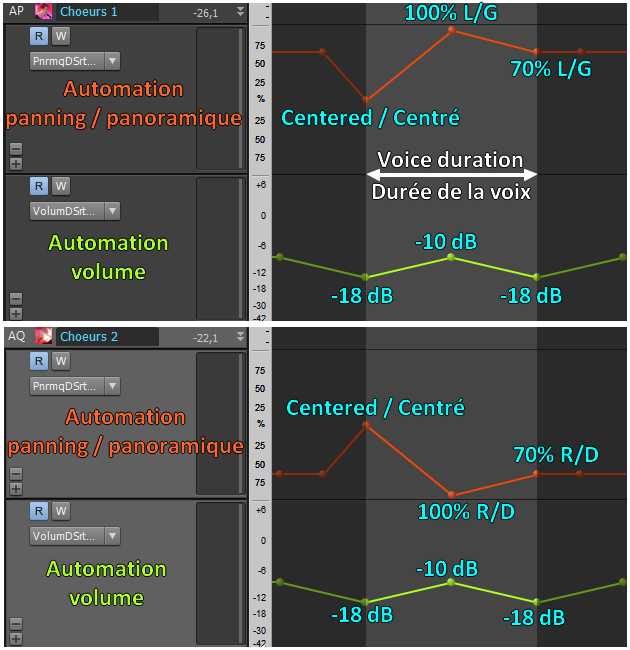
As mentioned earlier, I used automation for the volume and panning of Backing Vocals 1 and 2 in certain places. Here is an example. At about 2'14 into the song, you can hear voices that sound a bit like sighs. To give them movement while the voice lasts, I increased the volume from -18 dB to -10 dB, then brought it back down to -18 dB. At the same time, Backing 1 moves from center to 100% left then returns to 70% left, while Backing 2 moves from center to 100% right and ends at 70% right.
The sound therefore starts at the center and the backing vocals immediately move away to the left and right sides, while their volume increases then decreases.
Here is an example of Backing Vocal 1 automation:


(mp3 file)

Here is an example of Backing Vocal 2 automation:


(mp3 file)

And finally, both together:


(mp3 file)

Automation
Backing 1 and 2 automation, volume and panning
Backing vocal processing is finished. Below, we will look at the virtual vocals. These three vocal groups will meet on the main vocal bus before ending on the Master bus, along with all the other instruments in the song.

Mixing in practice : Preparing the session | Bass | Drums | Rhythm guitars | Lead guitars | Synths | Vocals | Mastering
Haut de page

VIRTUAL VOCALS

In addition to the backing vocals, I use voices from the Miroslav Philharmonik software, a VSTi that offers orchestral sounds, including male and female choirs recorded by professionals from a classical orchestra. These voices are not brought to the forefront, but they add a slightly dreamlike atmosphere to the song.

Recording Tracks - "Phil Choir 1" and "Phil Choir 2" Buses - Reverb - Automation - "Philharmonik Choir" Bus

Recording Tracks

Mono MIDI tracks linked to tracks
Panning: Center
Volume: 0 dB
Destination: The first track is routed to the "Phil Choir 1" bus; the second track is routed to the "Phil Choir 2" bus
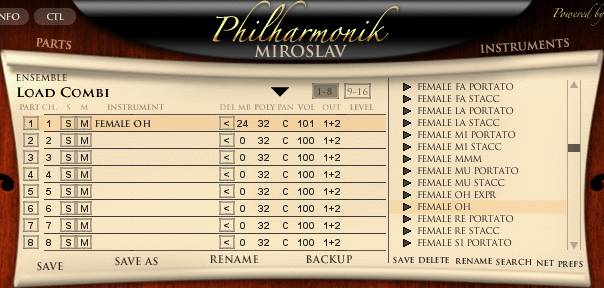

There are two virtual vocal tracks. These are MIDI compositions and not recordings via a microphone. Each of the two virtual vocal tracks consists of an audio track with an instance of the Miroslav Philharmonik plugin, associated with a MIDI track containing the MIDI score.

Both tracks are made with female choir sounds. The first track consists of choirs performing "oh" vocalizations, and the second track consists of choirs performing "ah" vocalizations.
Miroslav Philharmonik

"Phil Choir 1" and "Phil Choir 2" Buses

Sources: "Philharmonik 1" and "Philharmonik 2" tracks
Destination: "Philharmonik Choir" Bus
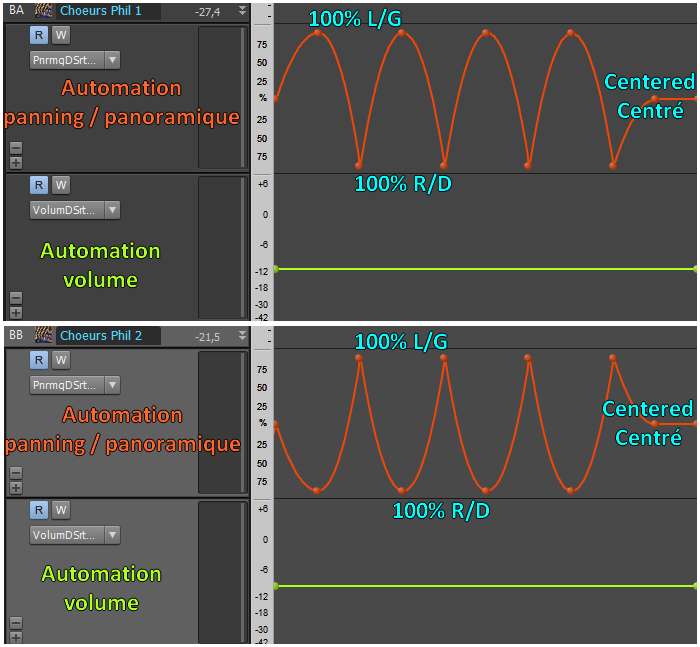
Panning: Variable, set by different automation on the two buses.
Volume: Variable, set by automation that changes from time to time throughout the song.
Plugins: Reverb
Here are the virtual choirs 1 without reverb:


(mp3 file)

And virtual choirs 2:


(mp3 file)

Although these voices are samples of real voices, this composition doesn't sound very realistic, as that is not the goal. For example, all the notes flow into each other, whereas real singers would need to take breaks to breathe. But in the context of the song Life, these voices are not highlighted at all; they only serve to fill the soundscape in the background. It is therefore unnecessary to worry about details that no one will ultimately hear. The goal is rather to achieve a pleasant and dreamlike background sound rather than a stunning orchestral choir that grips you.

Reverb

I placed a reverb on each of these same buses, "Phil Choir 1" and "Phil Choir 2".

Here are the virtual choirs 1 with reverb:


(mp3 file)

And the reverb for virtual choirs 2:


(mp3 file)

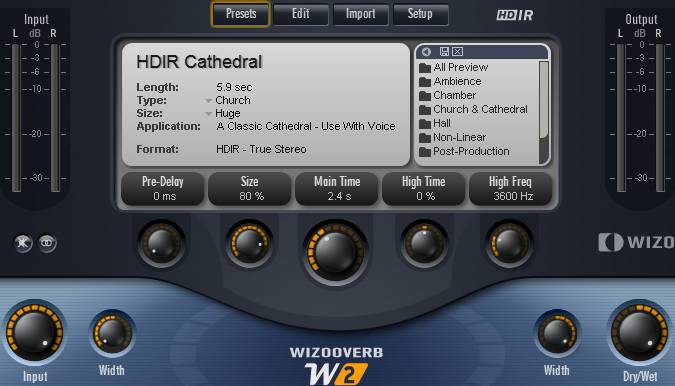
Here too, I used the Wizooverb plugin with the settings shown in the image below.

Here are the settings used with the WizooVerb plugin by Wizoo:

- I used the Cathedral preset. I set the "size" to 80% to achieve a significant space effect and give the impression that the choirs are in the background. The decay time is set to 2.4s. I adjusted the "Width" parameters so that the reverb spreads across the entire stereo field. At this stage, the panning is not yet set, so the audio examples place the sound in the center.

- The reverb amount is controlled with the "DryWet" knob. At 0%, no reverb is heard; at 100%, only the reverb is heard and no longer the dry sound. Here, it is set to 100%, and since the reverb plugin is placed on the bus where the raw voices arrive, only the reverberated sound will be heard in the song and not the dry sound at all.
Wizooverb Plugin
Wizooverb Plugin

Automation

Still on the same "Phil Choir 1" and "Phil Choir 2" buses, I applied volume automation (with only a few variations throughout the song) and, most importantly, panning automation. The virtual choirs constantly move from right to left, crossing each other, since the automations for the two virtual choirs are symmetrical. When one is on the left, the other is on the right and vice versa.

The image below corresponds to the passage heard in the audio clips; the volume doesn't move, but as you can see, the panning constantly shifts from left to right. This is clearly audible in the clips below.

Virtual Choir 1 Automation:


(mp3 file)

Virtual Choir 2 Automation:


(mp3 file)

Automation
Virtual Choir 1 and 2 automation, volume and panning

"Philharmonik Choir" Bus

Sources: "Phil Choir 1" and "Phil Choir 2" buses
Destination: Main Vocal bus
Panning: Center
Volume: 0 dB.
Plugins: an equalizer


This is the bus where the two virtual vocal buses converge. I apply fairly strong equalization that cuts all low and high frequencies, keeping only the mids around 1 kHz. This ensures they don't occupy too many frequencies, leaving plenty of room for other instruments in the song without sacrificing the quality of the chosen virtual voices. This aggressive equalization doesn't seem to denature the virtual voices, which are in the background of the mix anyway.

Virtual Choir 1 Automation (with EQ):


(mp3 file)

Virtual Choir 2 Automation (with EQ):


(mp3 file)

And finally, both together:


(mp3 file)

The processing of virtual voices is finished. These voices will now join the lead vocal and backing vocals on the main vocal bus, as we will see below.

Mixing in practice : Preparing the session | Bass | Drums | Rhythm guitars | Lead guitars | Synths | Vocals | Mastering
Haut de page

MAIN VOCAL BUS

Sources: "Lead Vocal" bus, "Backing 1" and "Backing 2" buses, "Philharmonik Choir" bus
Destination: Master Bus
Panning: Center
Volume: -7 dB.
Plugins: None


The different types of voices from the buses described above converge on this bus: lead vocals, backing vocals, and virtual voices. No plugins are necessary here, as all the processing I needed was applied previously.
Here is the final result of all the voices together on the main vocal bus:


(mp3 file)

Finally, the main vocal bus is routed to the Master bus to converge with all the other instruments in the song.

Mixing in practice : Preparing the session | Bass | Drums | Rhythm guitars | Lead guitars | Synths | Vocals | Mastering
Haut de page
Top of page


MESSAGES

(leave a message)

Messages page # 1 2 3 4 5 6 7 8 9 10 11 12 13 14 15 16 17 18 19 20 21 22 23 24 25 26 27 28 29 30 31 32 33 34 35


aissa
le 27/01/2013 à 14h24

Bonjour,

Je suis chanteur de reggae et rappeur, j'aurais voulu connaître vos tarifs pour l'enregistrement de quelques titres à moi.

Je souhaiterais faire la prise de voix plus le mix.

Je suis habitué au studio. Faites-vous des tarifs à la journée ?

Cordialement.

* * * * * * * * * * * * * * * *

<em>Bonjour Aissa,

Merci de votre confiance, mais je ne suis pas un professionnel. Je n'ai pas de studio, simplement un home studio dans une pièce de mon appartement.
Je me contente de faire mes propres enregistrements, à l'occasion je bosse avec quelques potes pour leur filer un coup de main, mais ce n'est pas mon métier !
Et puis je n'ai jamais mixé de reggae ou de rap, alors je m'en voudrais de faire mal les choses dans un style que je ne maîtrise pas. Je vous conseille de vous tourner vers un studio pro spécialisé dans votre style, il doit être possible d'en trouver des pas trop chers.

Grebz</em>


Veji
le 22/01/2013 à 02h42

Which particular Redwirez impulses
1)which mic(sm57/r121/421 etc)
2)distance(0''/0.5''/1''/2'')
3)cap/cone capedge etc
are your favorites for distortion and clean?

Also do you use the bass with shb-1 w/impulses or without?

Thanks

* * * * * * * * * * * * * * * *

<em>Hello again Veji,

Concerning the SHB-1 bass amp sim, I find it very usable with and without impulses. Depends on the sound you want to get. The sound is brighter without impulses, deeper with impulses. It also depends on the tone you select on your bass when recording, on the settings you have in SHB-1 and on the impulse you pick.

I also sometimes don't use any amp sim for the bass track, leaving only the direct sound if it fits the song.

Or you can have one bass track with direct sound only, and a second bass track (a copy of the direct track) with an amp sim. Mixing the 2 can bring you the qualities of each, but it could also blur your bass sound. You need to try various possibilities and see (or hear) for yourself. Each song is different, so don't think you got it set once and for all. You probably need to make adjustments and try different combinations every time.

Now about the Redwirez impulses:
It's pretty damn difficult to tell you which impulses sound best. You probably won't use the same impulses if you play Metal songs or Rock'n Rollish songs. I am pretty sure that ACDC, Marilyn Manson, the Beatles, Oasis, Nirvana, Opeth, Metallica, Muse and Radiohead don't use the same gear.

It might be a good idea to try and find out what gear your favorite bands use and pick something similar, if that's their music genre you want to play.

As for me, I often use Vox AC30, because I love the Vox sound. That's my favorite.
But I also use Orange impulses, Engl Pro, Marshall 1960 as second choices.
Soldano, Bogner Uberkab and Mesa Rectifier from time to time.

For bass cabs, I try them all and change frequently. I don't have one favorite in particular. I have 4 impulse collections from Redwirez for bass: 2 Ampegs, Aquilar and Hartke cabs. They all have different qualities.

About the microphones and their positionning: most of the time, I use 2 impulses per guitar track.
My starting point is one R121 mic, CapEdge, 4'', and one SM57 mic, Cap, 0''. I found this combination to be pretty complementary, and it gives me a sound I'm immediately satisfied with. But it's not perfect every single time.
From that starting point, I will try to change the distances a bit until I find THE perfect combination (to my ears). Could be R121 at 2'' instead of 4, or CapOffAxis instead of Cap, etc.
It can be very time-consuming, it takes a bit of trials and errors, but if you want to reach your goal, that is to get THE sound you like, you have to go through this.

I also use my own impulses, particularly the Vox AC4 impulses, which sound pretty good, I'm proud :-)

Also note that the guitar you use will make a difference. My main guitar is a Fender Stratocaster, but a friend of mine lent me his Tokai Les Paul, and so my impulse settings need to be different, because these guitars sound different.

I also use Neumann U87 impulses, 421 or 414 mics... Really, I try a lot of things and it takes time.
Oh... and you have to try it in context. I mean, if you try various impulses while listening to your soloed guitar track, you will find a great sounding impulse combination, but when you play all the tracks together with all instruments, you will find that your combination doesn't sound so great anymore.

Have fun,

Grebz</em>


Chochel
le 20/01/2013 à 07h40

J'ai tenté L'UCG 102 Behringer + AC Box Combo soi-disant facile, résultat : pas un son... Énervé, j'ai découvert Studio de Grebz.

Ma question :
Est-ce que j'oublie l'UCG102 ?
Quel montage serait le plus aisé et le plus simple pour un premier essai ? Le combo Marshall ?

Par la suite, je tenterai des montages plus sophistiqués.

Cordialement,
JP


Veji
le 19/01/2013 à 15h50

Hi,
What are your top 5 best amp plugins and top 5 best cab impulses?
Also can you send me the recabinet 2... I can't find it anymore.
Thanks

* * * * * * * * * * * * * * * * *

<em>
Hi,

My favorite amp plugins for guitar are:
 - Ignite Amps' NRR1 (free product).
 - TSE's X50 (free product).
 - Kuassa's Amplifikation Creme (retail product), US$ 34. Only emulates one amp, but the sound you get is fantastic.
 - Overloud's TH2 (retail product), much more expensive - US$ 197 - but it emulates several real amps.

And for bass :
 - Ignite Amps' SHB1
 - Helian's 1st Bass or 2nd Bass (free products), which sound the same to me.

As for impulses, I use only Redwirez' impulses (retail products) which in my opinion are the ones that sound best of all the impulses I've tested so far. They're not free, but they're really unexpensive. The first cab impulses you buy will cost you US$9, then the more you buy, the more discount you get for the next impulses. And you can pick only the impulses you are interested in.

I cannot send you Recabinet's impulses, they are a discontinued retail product. They have been replaced by Recabinet 3, which cost only US$ 19.99 at the moment. That's quite a bargain, even though I think that Recabinet's impulses are not as good as Redwirez'. Your choice.

Finally, I am not sending any retail product to anyone. On my site, I make a large collection of free products available (amp sims, impulse loaders and impulses) for anyone to download, but I am not giving away any commercial products.

Cheers,
Grebz
</em>


Jak2112
le 08/01/2013 à 18h38

Salut !
Tout d'abord, félicitations et merci pour ce super site que je viens de découvrir et qui est très utile, notamment pour ceux qui débutent comme moi dans la MAO.
Donc en ce moment j'explore et je teste, mais j'ai un petit problème : je n'arrive pas à lire les extraits que vous proposez pour illustrer les différents plugins et logiciels ; le petit lecteur indique : Liste vide ! Peut-être ai-je oublié une manip en route ou autre ? Si vous pouviez m'aider ce serait super.
Merci d'avance et encore bravo !
Cordialement.
Jak2112

* * * * * * * * * * * * * * * *

<em>Bonjour, et merci !

En ce qui concerne le problème de lecture des extraits... il s'agit de lecteurs Flash, il peut donc y avoir des problèmes de compatibilité avec certains navigateurs.

De plus, si vous utilisez un système Apple, sachez qu'Apple a décidé (unilatéralement) de bannir Flash de ses machines, donc impossible de lire quoi que ce soit en Flash avec un iPad par exemple ou un iPhone. Pour les ordinateurs Mac, je ne sais pas trop, je n'ai pas eu l'occasion d'essayer, mais je crois avoir lu que c'était possible en téléchargeant le plugin Flash Player, comme sur PC. En ce qui concerne Linux, j'ai lu que seul le navigateur Chrome proposait la compatibilité Flash.

Entre parenthèses, il vaut mieux que vous soyez sur PC si vous comptez télécharger des choses sur mon site, parce que je ne propose que des plugins pour PC. Je suis moi-même utilisateur PC, donc je ne connais pas l'univers Mac ou Linux. Rien de sectaire, mais je suis un simple particulier, je ne peux pas m'occuper de tout, donc je m'occupe de ce que je connais uniquement ! Mais utiliser un Mac pour faire de la MAO est une excellente chose, aucun doute là-dessus. Après, tout est question de préférence et d'affinités. Fin de la parenthèse.

Si vous êtes sur PC avec Windows, il n'y a pas de raison que vous ne puissiez pas lire les extraits, à moins que votre navigateur Internet soit trop ancien, donc pas à jour ou incompatible, mais tous ceux que je connais fonctionnent bien. J'ai testé avec Internet Explorer, Chrome, Firefox, Opera et Safari, et mon site fonctionne bien avec chacun d'entre eux.

Ce que je vais faire, c'est essayer de proposer systématiquement de télécharger les extraits sonores en version mp3, ce qui permettra à tout le monde de pouvoir quand même les écouter même lorsque le lecteur Flash ne fonctionne pas. Il va me falloir un peu de temps pour mettre tout ça en place, mais je vais le faire rapidement, promis.

Grebz</em>

Top of page

