

? | Home page | Tutorial | Recording

I prefer to record them last but there are no rules. If you prefer to record them first, then do so.
To record vocals, make sure the place is quiet, shut the door, tell the people who live with you to be quiet, and do not record while your neighbor is drilling holes through his kitchen walls! Also, turn off your monitors and use a headset instead to avoid recording the playback with your microphone.
Condenser or dynamic microphones?
Dynamic microphones are solid, they don' need a power source, they can take heavy acoustic pressure (like a kick drum or a saxophone) and they are not too expensive. They are also less sensitive to surrounding noises than condenser microphones. The cons are they lack clarity in the high range, which renders takes less clear and defined than with condenser microphones. They can be used with Jack or XLR plugs.
Condenser microphones are much more responsive and accurate. Their high sensitivity is double-edged, because they will capture any noise when recording. The fans of your PC are noisy? Chances are this noise will be recorded. Sound comes out of your headset? It will be recorded by your condenser microphone. Children are loudly playing outside? You might get that too. However, some condenser microphones are called "cardioid", or "hyper cardioid", and they only record what comes from a specific direction, ignoring (more or less) other sound sources from other directions. On the contrary, omnidirectional microphones record what comes from anywhere. Not ideal for a home studio. Condenser microphones are also more fragile (don't knock them) and must be powered through a "phantom power", whose standard is 48 volts. This kind of power is either present on your audio interface and can be turned on and off with a button, or it will require the use of an external phantom power source that you will then connect to your audio interface. You have to use 3-pin XLR plugs that carry the phantom power current. Finally, condenser microphones are usually rather expensive, some of them cost several thousand euros (or dollars, or pounds), but only professional studios or rich amateurs can afford those. On the plus side, the sound you get with a condenser microphone will have the best quality.
Be cautious though, a good dynamic microphone is worth better than a bad condenser microphone. No big secret here, for microphones like for anything else, very low prices are rarely synonymous with good quality.
A few known and renowned microphone brands: AKG, Milab, Neumann, Rode, Sennheiser, Shure...
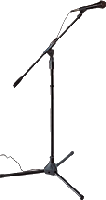
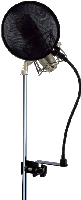
Some pieces of advice: buy a microphone stand and a pop filter (you can also make one yourself with wire and a piece of tights from your wife / girlfriend / mother / daughter / neighbor). The stand will prevent you from manually holding your microphone and thus produce handling noises. As for the pop filter, it prevents the air to hit the microphone and produce unwanted blowing sounds when you pronounce some letters such as "p" or "b".
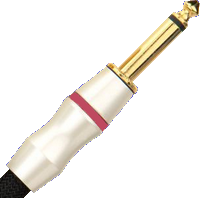
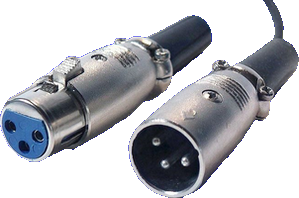
Jack plug (left) and XLR (right)

No need to go on and on forever, recording is rather easy. As long as you pay attention to your recording levels and take care over your takes, you should get a satisfying result, good enough to finalize the song
Messages page # 1 2 3 4 5 6 7 8 9 10 11 12 13 14 15 16 17 18 19 20 21 22 23 24 25 26 27 28 29 30 31 32 33 34 35

krickgpe
le 03/05/2017 à 08h34
Bonjour et merci pour ce site très instructif. Les conseils de mixage de guitare et de basse s'appliquent-ils aussi à des pistes déjà enregistrées, je veux dire non enregistrées en live dans le daw ? Merci.
* * * * * * * * * * * * * * * *
<em>En ce qui concerne le mixage de guitares (ou basses) enregistrées par ailleurs, il faut tenir compte de la façon dont elles ont été enregistrées.
Dans mon didacticiel, je pars d’un enregistrement totalement dénué d’effets (guitares branchées directement dans l’interface audio), et j’y ajoute des simulateurs d’ampli, des chargeurs d’impulsions, de la distorsion, etc.
Bien évidemment, si vous utilisez un enregistrement d’une guitare qui passe déjà par un ampli, vous pouvez vous passer de l’étape « simulateur d’ampli » et « chargeur d’impulsions ».
Si l’enregistrement comporte déjà un son de guitare avec de la distorsion, il n’est sans doute pas nécessaire d’en rajouter, sauf si vous pensez qu’il n’y a pas assez de distorsion.
Pareil pour la réverb : si l’enregistrement comporte déjà une réverb audible, il vaut mieux ne pas en rajouter.
En revanche, vous allez sans doute devoir travailler un peu l’égalisation de votre guitare enregistrée pour qu’elle s’intègre à votre mix. Là aussi, adaptez l’EQ à votre mixage en cours, en fonction des instruments déjà présents. Toute égalisation doit se faire en fonction du reste du mix, et pas uniquement sur l’instrument tout seul. Il faut à la fois respecter le timbre de l’instrument, mais aussi veiller à ce qu’il s’intègre bien au tout. Diminuez par exemple un peu les fréquences graves de la guitare pour laisser de la place à celles de la basse. Le mixage est un jeu d’équilibre entre les différents instruments présents.
Ce didacticiel n’est pas un guide à suivre aveuglément en toutes circonstances, c’est plutôt une manière de montrer sur quels paramètres on peut agir, mais c’est à vous de choisir et doser les paramètres adaptés à votre musique.
Grebz</em>
Panigutti
le 18/04/2017 à 20h57
Great work thanks you from paraguay
zakk33
le 05/04/2017 à 18h38
Bonjour,<br/>
Je possède un ampli à lampes Jet City en combo et j'ai vu que l'on pouvait se servir du son de son ampli (préamp) avec des IR à l'aide d'une DI box branchée sur les sorties HP de mon ampli.<br/>
Faut-il une DI qui fasse en plus obligatoirement sim de cab comme les Palmer pdi09, Redbox de chez HK ou Behringer ultra gi100 ?<br/>
En sachant que je n'ai pas de boucle d'effet ni de line in/out, quelle DI pas chère me conseillez-vous ?<br/>
Après, j'utilise des impulsions Ownhammer et Redwirez avec le cab avec un simulateur d'ampli, mais je ne vois pas comment faire pour faire fonctionner un loader d'impulse avec le séquenceur Reaper (sans simu d'apli).<br/><br/>
Merci pour votre éclairage :)<br/><br/>
* * * * * * * * * * * * * * * *<br/><br/>
<em>Bonjour Chris,<br/><br/>
Merci de votre visite sur mon site.<br/>
Très honnêtement, n’utilisant pas de DI ni d’ampli connecté à mon PC d’aucune manière, je ne connais pas les branchements dont vous parlez dans votre message.<br/><br/>
En revanche, pour ce qui est d’utiliser un chargeur d’impulsions et des impulsions avec Reaper, voici comment procéder :<br/>
* Sélectionner la piste voulue pour insérer un plugin, et cliquer sur le bouton FX<br/>
* Deux nouvelles fenêtres apparaissent, dont une avec la liste des plugins détectés par Reaper sur votre ordinateur.<br/>
Sélectionnez votre chargeur d’impulsions puis cliquez sur OK.<br/>
* L’interface du chargeur d’impulsions va alors apparaître dans l’autre fenêtre<br/>
* Vous n’avez plus qu’à y charger la ou les impulsions de votre choix.<br/>
Une fois vos réglages effectuées, vous pouvez fermer cette fenêtre, et vous pourrez la faire réapparaître en cliquant de nouveau sur le bouton FX de la piste.
Si vous voulez ajouter d’autres plugins sur cette piste, cliquez sur le bouton FX pour faire apparaître la fenêtre de plugin, et cliquez sur le bouton « Add » en bas à gauche, ce qui fera apparaître de nouveau la liste des plugins, choisissez le plugin qui vous intéresse comme précédemment et il sera ajouté. Ajoutez par exemple un simulateur d’ampli, et placez-le avant le chargeur d’impulsions en le sélectionnant et en le faisant glisser au-dessus de NadIR.<br/>
Bien entendu, procédez de la même manière pour n’importe quel type de plugin (réverb, delay, EQ, etc.) pour les ajouter à une piste.<br/>
Grebz</em>
Dr Bonkers
le 26/03/2017 à 19h06
Hi, If you are looking for guitar cab and bass cab impulse response (IR) files, you might want to check out my site. I am always adding new guitar cabinet or bass cabinet ir's usually on a weekly or monthly basis in both Fractal Audio & Wav file formats. Currently I have the following for sale:
Ampeg B-15
Aguillar DB810
SVT 8X10
SWR Super Redhead
Norlin Gibson Moog Lab Series L5
1959 Valco Supro 1606 branded as Oahu Publishing Co of Cleveland Ohio 1X6
Sound samples may be found in the Samples tab of my site, which is Google translate compatable.
If you have any quesions tht the site does not answer, please feel free to contact me.
https://www.drbonkerssoundlab.com/
Best,
Dr. B
Latency
le 01/03/2017 à 20h22
Best guitar sim for clean? Not many out there with a clean focus.
* * * * * * * * * * * * * * * *
<em>In the free sims, I'd say the best for clean sounds are the Ignite Amps sims. All of them can handle clean sounds: NRR1, Anvil and even Emissary.
Lepou's sims are also able to produce nice clean sounds, like LE456, Hybrit or Lecto.
Don't forget that free amp sims are usually simulating only the head part of an actual amp. You will need to add an impulse loader (such as Lepou's Lecab 2 or Ignite Amp's NadIR), and load impulses into them. The choice of the impulse will have a huge impact on the sound quality.
Commercial amp sims all have the ability to handle many types of sound. Amplitube, TH3, Revalver, S-Gear 2 can be recommended, although they can be expensive. Among the simplest (and less versatile) commercial sims, you can try Vermillion from Kuassa, which can produce nice clean sounds as well, and will include the impulses as well.
Grebz</em>